SAEDNEWS: The Surface Laptop 5 offers good to excellent performance for Photoshop and photo editing. However, its lack of a dedicated graphics card can limit performance in demanding video editing tasks. This article reviews its specifications, benchmarks, and compares it with better alternatives to help you decide
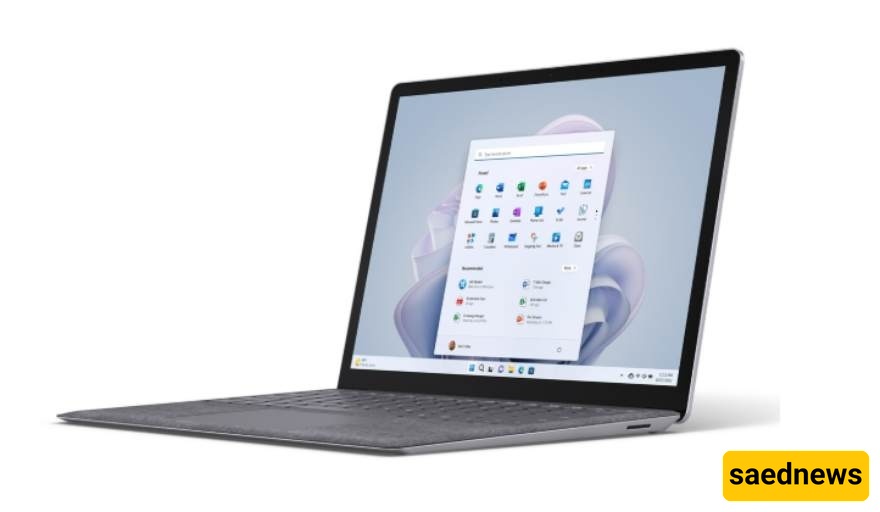
According to Saednews, If you're considering buying the Surface Laptop 5, it's important to know that this device delivers good to excellent performance for photo editing in Photoshop. However, when it comes to demanding video editing tasks, its lack of a dedicated graphics card can create noticeable limitations.
In this article, we'll examine its specifications, performance, strengths, and weaknesses to help you decide whether it's the right laptop for your creative workflow.
Feature | Surface Laptop 5 (13.5-inch) | Surface Laptop 5 (15-inch) |
|---|---|---|
Processor | Intel Core i5-1235U or i7-1255U (12th Gen) | Intel Core i7-1255U (12th Gen) |
Graphics | Integrated Intel Iris Xe | Integrated Intel Iris Xe |
Memory | 8GB or 16GB LPDDR5x | 8GB, 16GB, or 32GB LPDDR5x |
Storage | Replaceable SSD: 256GB or 512GB | Replaceable SSD: 256GB, 512GB, or 1TB |
Display | 13.5-inch PixelSense, 2256 × 1504 resolution, 3:2 aspect ratio, touchscreen, Dolby Vision IQ | 15-inch PixelSense, 2496 × 1664 resolution, 3:2 aspect ratio, touchscreen, Dolby Vision IQ |
Battery Life | Up to 18 hours (typical usage) | Up to 17 hours (typical usage) |
Weight | Approximately 1.27–1.3 kg | Approximately 1.56 kg |
Ports | USB-C with Thunderbolt 4, USB-A, headphone jack, Surface Connect | Same as 13.5-inch model |
Additional Features | Wi-Fi 6, Bluetooth 5.1, 720p camera with Windows Hello, Omnisonic speakers with Dolby Atmos | Same as 13.5-inch model |
The Surface Laptop 5 performs very well for photo editing, especially for light to moderate professional workloads. Models equipped with the Intel Core i7 processor and at least 16GB of RAM can comfortably handle large image files, multiple layers, and advanced Photoshop filters.
One of the laptop's biggest strengths is its high-quality PixelSense display. With excellent color accuracy and factory calibration, it is well suited for photographers, graphic designers, and content creators who require precise image editing.
Users and reviewers consistently report smooth Photoshop performance, while the laptop remains quiet and cool during intensive editing sessions.
Recommendation: If you frequently work with large RAW files or complex Photoshop projects, choose a configuration with at least 16GB of RAM. The 8GB model may struggle with heavy multitasking.
Video editing is where the Surface Laptop 5 begins to show its limitations. Since it relies on integrated Intel Iris Xe graphics rather than a dedicated GPU, demanding video-editing projects can be challenging.
When working with 4K footage, complex timelines, or multiple effects in applications such as Premiere Pro or DaVinci Resolve, users may experience:
Timeline lag and stuttering
Slower export times
Increased CPU workload
Reduced performance during real-time playback
For lighter editing tasks, such as 1080p content creation, social media videos, or basic editing projects, the Surface Laptop 5 remains a capable and reliable option.
However, professional video editors who regularly work with high-resolution footage and advanced effects will benefit from a laptop equipped with a dedicated graphics card.
Excellent display with strong color accuracy
Lightweight, premium design
Long battery life for mobile productivity
Quiet and cool operation under load
Very good performance for Photoshop and photo editing
No dedicated GPU
Limited performance for heavy video editing and 3D rendering
Power-efficient U-series processor is not ideal for highly demanding workloads
Newer laptops released in recent years offer significantly better performance
The Surface Laptop 5 remains a premium and dependable laptop for users whose primary focus is Photoshop, photography, graphic design, and general creative work. It combines a high-quality display, excellent portability, and solid everyday performance in a sleek package.
If your workflow includes only occasional or light video editing, the Surface Laptop 5 can still meet your needs effectively.
However, if professional video editing, 4K production, advanced visual effects, or fast rendering are your priorities, you should consider more powerful alternatives with dedicated graphics, such as the Surface Laptop Studio series or other creator-focused laptops.
Overall, the Surface Laptop 5 is best suited for photographers, designers, students, and professionals who value portability and display quality more than raw video-editing power.