SAEDNEWS: Google Chrome Automatically Installs Internet Download Manager Extension After Installation (Just Enable It)

According to Saed News and Fardars:
If you accidentally removed the Internet Download Manager (IDM) extension, you can manually reinstall it in Chrome by following these steps:
Go to the IDM installation folder, which is usually located at:
C:\Program Files (x86)\Internet Download Manager
Find the file named IDMGCExt.crx.
Drag and drop this file into the Chrome extensions page.
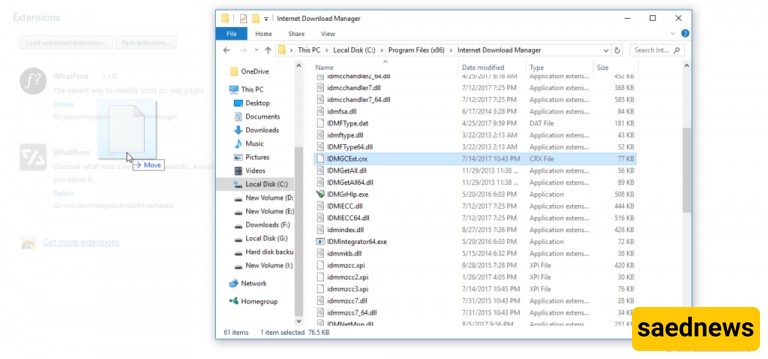
To access the extensions page, type the following address in Chrome and press Enter:
chrome://extensions
Alternatively, go to the Chrome menu, open More Tools, and click Extensions.
After this, the IDM extension will be installed in Google Chrome.
If IDM is disabled or causing issues in Firefox, first remove it completely. Then:
Download the file idmzzcc.xpi from the provided source.
Drag and drop the downloaded file into the Firefox address bar.
The IDM extension will then be installed in Firefox.